How matching and confidence scores work
How we find possible obituaries, how the confidence score is built, and which settings you control.
Last updated October 8, 2026
Plan: All plans · For: Everyone · Time: 5 min read
When a new obituary is published, we compare it with your watches. If enough details line up, it becomes a match for you to review.
1. Where obituaries come from
We monitor 17,565+ funeral homes and newspapers across the U.S. (16,585 funeral homes and 980 newspaper obituary sources), around the clock.
2. Finding candidates
We first look for obituaries with your watch's last name, or its maiden or previous last name. Then we score each one against everything else you told us.
3. Building the confidence score
The confidence score is a number from 0 to 100. It's a tally of the evidence: each detail that agrees adds points, and each detail that disagrees takes points away. It isn't a percentage chance that it's the right person.
| Evidence | Effect on the score |
|---|---|
| Last name (or maiden name) matches | Large increase |
| First name, or a known nickname or variation, matches | Large increase |
| Middle name matches | Increase. A different middle name lowers the score |
| Same state, and same city | Increase. A different location lowers it |
| A relative you listed is named | Increase for each relative, up to a limit |
| Age, birth year, or date of birth | Can raise the score, lower it, or rule the match out if it clearly conflicts |
Two safety rules:
- A name alone in a different state isn't a match. We need more than a shared name.
- If we can't confirm the location from the obituary, the score stays below 90. You'll still see it in Matches to Review, but it won't be labeled high confidence.
4. Reading the score
| Score | Label | What to do |
|---|---|---|
| 90–100 | High | Very likely the right person. Read the obituary to confirm |
| 80–89 | Medium | A good candidate. Check the details carefully |
| Below 80 | Low | Possible. Needs more research |
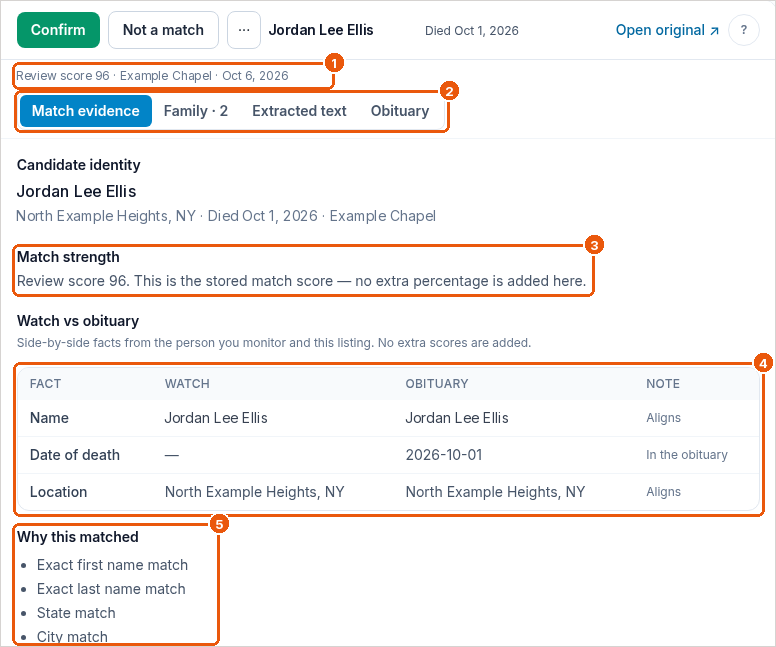
On each match, Match evidence shows the score and a side-by-side table of your watch against the obituary, with a note on each fact.
5. Two settings you control
| Setting | Where | What it decides |
|---|---|---|
| Match sensitivity | On each watch | How strong a candidate must be before it's added to Matches to Review. Close lists fewer, Recommended is the default, Broad lists more |
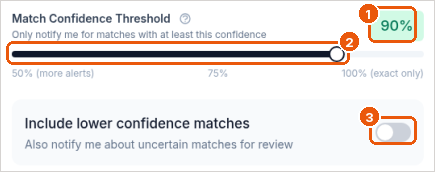
| Match threshold | Notifications, for your whole account | Which matches we email you about. Default 90%. We only email matches at or above it |
So a match can appear in Matches to Review without an email, if its score is below your threshold. Nothing is hidden. Everything that clears your watch's sensitivity is listed for you.
A worked example
Your watch: Margaret Ann Ellis, Dayton, Ohio. Born 1941. Daughter: Karen.
Obituary found: "Margaret 'Peggy' Ellis, 85, of Dayton, Ohio… survived by her daughter, Karen…"
- Last name and first name match: large increases.
- Dayton, Ohio matches: increase.
- Age 85 fits a 1941 birth year: increase.
- Karen is named: increase.
Result: a high score, likely above 90. You'd get an email and see it in Matches to Review.
If the same name appeared in an obituary from Oregon with no age and no relatives, it wouldn't be treated as a match.