Help · Notifications & Alerts
How email alerts work
Alerts are sent by email: instantly, as a daily digest, or as a weekly digest.
Last updated October 8, 2026
Plan: All plans · For: Everyone · Time: 3 min
We tell you about new matches by email, sent to the email address on your account. You choose how often.
Choose how often you hear from us
- In the sidebar, select Notifications.
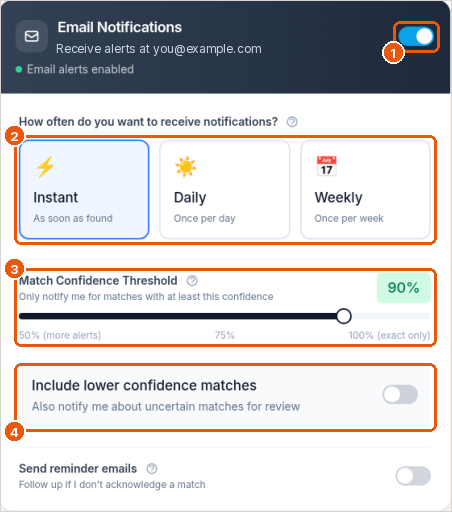
- Make sure Email Notifications is on (callout 1).
- Under How often do you want to receive notifications?, choose one (callout 2):
- Instant: an email as soon as we find a match.
- Daily: one digest email a day.
- Weekly: one digest email a week.
- If you choose Daily or Weekly, a Send at picker appears. Pick the hour you'd like the digest to arrive. Times are U.S. Eastern.
- Set your Match Confidence Threshold (callout 3). We only email you about matches at or above it. The default is 90%.
Reminders
Turn on Send reminder emails if you'd like a nudge about matches you haven't reviewed yet.
Where alerts go
- Alerts go only to the email address on your account. On Professional plans, teammates don't get their own copies. They can see matches when they sign in.
- Every match is also listed in Matches to Review, whether or not we emailed you about it.
Alerts are email only.
Related
Was this helpful?