
ObituaryMonitorObituaryMonitor
  • Help center

    • Overview
    • Video tutorials
    • Contact support
  • Step-by-Step Tutorials

    • Tutorial: Your Dashboard Explained
    • Tutorial: Creating Your First Watch
    • Tutorial: Reviewing and Confirming Matches
    • Tutorial: Generating PDF Audit Reports
    • Tutorial: Setting Up Notifications
    • Tutorial: Case Management (Professional)
    • Tutorial: Bulk Import & Export (Professional)
    • Tutorial: Team Management (Professional)
    • Tutorial: Custom Branding (Professional)
  • Getting Started

    • What is ObituaryMonitor?
    • Setting Up Your Account
    • Choosing the Right Plan
  • Integrations

    • Integrations Overview
    • Connecting Your Clio Account
    • Importing Clio Matters as Watches
    • How Clio Sync Works
    • Clio Integration Troubleshooting
    • Connecting MyCase
    • Syncing Time Entries
    • Linking Cases to Matters
  • Managing Watches

    • Adding a New Watch
    • Editing a Watch
    • Watch Statuses Explained
    • Why Location Matters
  • Understanding Matches

    • How Matching Works
    • Confidence Scores Explained
    • Confirming vs Dismissing Matches
  • Notifications & Alerts

    • Notification Channels
    • Troubleshooting Email Delivery
  • Account & Billing

    • Upgrading Your Plan
    • Updating Payment Method
    • Canceling Your Subscription
  • Privacy & Security

    • Watch List Privacy
    • Data Protection
  • Cases & Matters

    • Case Management Overview
    • Creating a Case
    • Case Reports & Export
  • Professional Features

    • Activity Logs
    • Bulk Import & Export
    • Team Management
    • Custom Branding
  • Getting Help

    • Support Ticket Types
    • Response Times
ObituaryMonitorObituaryMonitor
  • Help center

    • Overview
    • Video tutorials
    • Contact support
  • Step-by-Step Tutorials

    • Tutorial: Your Dashboard Explained
    • Tutorial: Creating Your First Watch
    • Tutorial: Reviewing and Confirming Matches
    • Tutorial: Generating PDF Audit Reports
    • Tutorial: Setting Up Notifications
    • Tutorial: Case Management (Professional)
    • Tutorial: Bulk Import & Export (Professional)
    • Tutorial: Team Management (Professional)
    • Tutorial: Custom Branding (Professional)
  • Getting Started

    • What is ObituaryMonitor?
    • Setting Up Your Account
    • Choosing the Right Plan
  • Integrations

    • Integrations Overview
    • Connecting Your Clio Account
    • Importing Clio Matters as Watches
    • How Clio Sync Works
    • Clio Integration Troubleshooting
    • Connecting MyCase
    • Syncing Time Entries
    • Linking Cases to Matters
  • Managing Watches

    • Adding a New Watch
    • Editing a Watch
    • Watch Statuses Explained
    • Why Location Matters
  • Understanding Matches

    • How Matching Works
    • Confidence Scores Explained
    • Confirming vs Dismissing Matches
  • Notifications & Alerts

    • Notification Channels
    • Troubleshooting Email Delivery
    • Setting Up SMS Alerts
  • Account & Billing

    • Upgrading Your Plan
    • Updating Payment Method
    • Canceling Your Subscription
  • Privacy & Security

    • Watch List Privacy
    • Data Protection
  • Cases & Matters

    • Case Management Overview
    • Creating a Case
    • Case Reports & Export
  • Professional Features

    • Activity Logs
    • Bulk Import & Export
    • Team Management
    • Custom Branding
  • Getting Help

    • Support Ticket Types
    • Response Times
  1. Knowledge base
  2. Step-by-Step Tutorials
  3. Tutorial: Setting Up Notifications

Step-by-Step Tutorials

Tutorial: Setting Up Notifications

Configure email, SMS, and in-app alerts

Last updated February 25, 2026

Setting Up Notifications: Complete Tutorial

Get notified immediately when matches are found. This tutorial covers all notification options.


What You'll Learn

  • Email notification setup
  • SMS text message alerts
  • In-app notifications
  • Notification preferences
  • Troubleshooting delivery issues

Accessing Notification Settings

Method 1: Account Menu
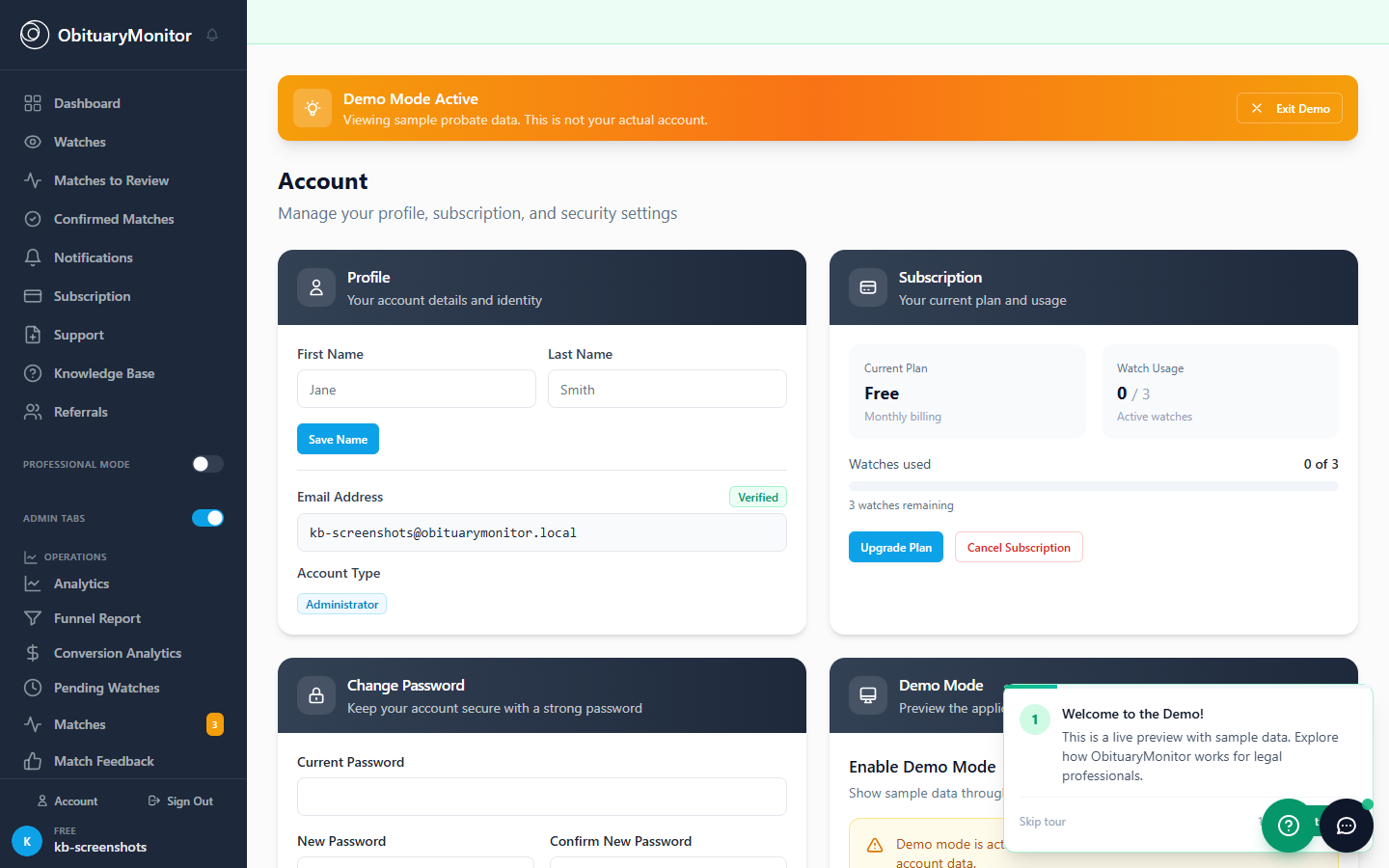
Account dropdown menu
  1. Click your email in the bottom left
  2. Select "Account"
  3. Go to "Preferences" tab

Method 2: Direct Navigation

Preferences page
Preferences page
  1. Click "Notifications" in sidebar
  2. Or go to Account > Preferences

Email Notifications

Email notification settings

Enable/Disable Options

Notification TypeDefaultRecommended
Match AlertsONON (critical)
Weekly DigestONON
Account UpdatesONON
MarketingOFFYour choice

Setting Up Email Alerts

Step 1: Verify Your Email

Email verification
Email verification
  1. Check that your email is correct
  2. Click "Verify Email" if needed
  3. Click the link in verification email

Step 2: Configure Preferences

Email preference toggles
  1. Toggle each notification type
  2. Click "Save Changes"
  3. Changes take effect immediately

SMS Text Notifications

SMS settings section

Adding Your Phone Number

Step 1: Enter Phone Number

Phone number input
Phone number input
  1. Go to Account > Preferences
  2. Find "SMS Alerts" section
  3. Enter your mobile number
  4. Select country (US/Canada)

Step 2: Verify Your Number

Verification code entry
  1. Click "Send Verification Code"
  2. Enter the 6-digit code from your text
  3. Click "Verify"

Step 3: Enable SMS Alerts

SMS toggle enabled
SMS toggle enabled
  1. Toggle "SMS Alerts" to ON
  2. Click "Save Changes"
  3. You'll now receive text messages

In-App Notifications

Notification bell in header

Notification Bell

  • Shows in top navigation
  • Red badge = unread notifications
  • Click to view recent alerts

Notification Center

Notification dropdown open

Shows:

  • Match alerts
  • System updates
  • Team activity (Pro)
  • Deadline reminders (Pro)

Weekly Digest Email

Weekly digest email example

What's Included

  • Active Watches count
  • Scans Performed this week
  • New Matches found
  • Action items needed

Configure Digest

Digest settings
Digest settings
  1. Toggle "Weekly Digest" ON/OFF
  2. Choose delivery day (default: Monday)
  3. Choose delivery time

Troubleshooting

Emails Not Arriving?

  1. Check spam/junk folder - Search for "obituarymonitor"
  2. Add to safe senders - notifications@obituarymonitor.com
  3. Verify email address - Check Account settings
  4. Check provider - Some work emails block notifications

SMS Not Arriving?

  1. Verify phone format - Include area code
  2. Check carrier - Some block short codes
  3. Re-verify number - Remove and re-add

Next Steps

  • Tutorial: Managing Your Watch List
  • Troubleshooting Email Issues
  • Account Settings Overview

Was this article helpful?

Previous
Tutorial: Generating PDF Audit Reports
Next
Tutorial: Case Management (Professional)

Related articles

Tutorial: Your Dashboard ExplainedTutorial: Creating Your First WatchTutorial: Reviewing and Confirming Matches

Still need help?

Can't find what you're looking for? Contact our support team.

ObituaryMonitor

Obituaries

Monitored 24/7

Save watches for free
No credit card required
Cancel anytime
Get startedBook a demo
ObituaryMonitor

Obituaries

Monitored 24/7

Save watches for free
No credit card required
Cancel anytime
Get startedBook a demo

Product

  • For Families
  • Professional Plans
  • How It Works
  • Death Verification API
  • Daily County Intelligence
  • How Matching Works
  • Compare Plans
  • All Pricing

By Industry

  • Probate Attorneys
  • Estate Attorneys
  • Insurance Companies
  • Debt Collectors
  • Private Investigators
  • Skip Tracers
  • Genealogists
  • Family Research
  • Real Estate Investors

Company

  • About Us
  • Press & Media
  • For Researchers
  • Obituary Data
  • Contact Sales
  • Security
  • Compliance

Resources

  • Help Center
  • Video Tutorials
  • FAQ
  • Verify API docs
  • Our Methodology
  • Advanced Name Matching
  • All Guides
  • Funeral Home Directory
  • vs. Google Alerts for Law Firms
  • Legal Disclaimer

Newsletter

Obituary data insights, professional tips, and product updates — monthly to your inbox.

Popular Jurisdictions

Cook County, ILPalm Beach, FLLos Angeles, CAHarris County, TXMaricopa, AZView All →

Coverage Directory

Providing probate due diligence logs and death notice alerts in all 50 states and the District of Columbia.

Alabama•Alaska•Arizona•Arkansas•California•Colorado•Connecticut•Delaware•Florida•Georgia•Hawaii•Idaho•Illinois•Indiana•Iowa•Kansas•Kentucky•Louisiana•Maine•Maryland•Massachusetts•Michigan•Minnesota•Mississippi•Missouri•Montana•Nebraska•Nevada•New Hampshire•New Jersey•New Mexico•New York•North Carolina•North Dakota•Ohio•Oklahoma•Oregon•Pennsylvania•Rhode Island•South Carolina•South Dakota•Tennessee•Texas•Utah•Vermont•Virginia•Washington•West Virginia•Wisconsin•Wyoming• District of Columbia
ObituaryMonitor© 2026 Northgate Leland, LLC d/b/a ObituaryMonitor. All rights reserved.
Privacy PolicyTerms of ServiceLegal DisclaimerContact