
Daily County Intelligence
Connect by API: keys, test pulls, and limits
Create an API key, run a test pull, copy a code sample, and understand pull limits and errors.
Plan: Daily County Intelligence · For: Developers · Time: 6 min read
Use the API to pull new notices into your CRM or data pipeline. Each pull returns only notices you haven't received yet on that key, so you never process the same notice twice.
Before you start
- Turn on Pull into your systems on Markets & Delivery. See Choose your markets and delivery.
- Record your attestation on the Compliance page. See Record your compliance attestation.
Create an API key
You create and manage your own API keys. Our team sets up your account, and from then on you can add, rotate, or remove keys whenever you need to.
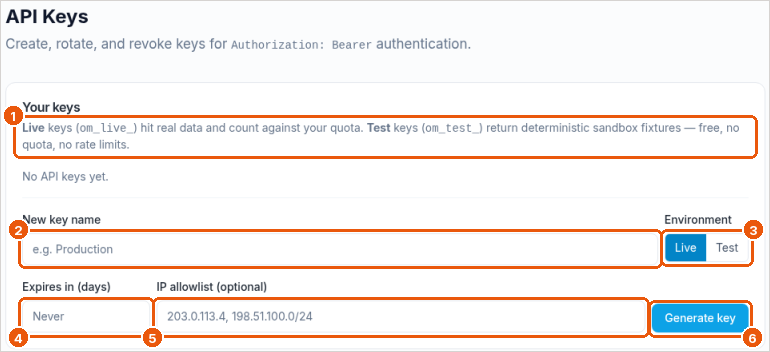
- In the sidebar, under Developer tools, select API Keys.
- Enter a name for the key, such as "CRM production" (callout 2).
- Choose the environment (callout 3). Live keys (
om_live_…) return real notices and count toward your usage. Test keys (om_test_…) return sample data (callout 1). - Optional: set when the key expires (callout 4) and limit it to your servers' IP addresses (callout 5).
- Select Generate key (callout 6). Copy the key and store it somewhere safe.
You can have up to 10 active keys.
Run a test pull
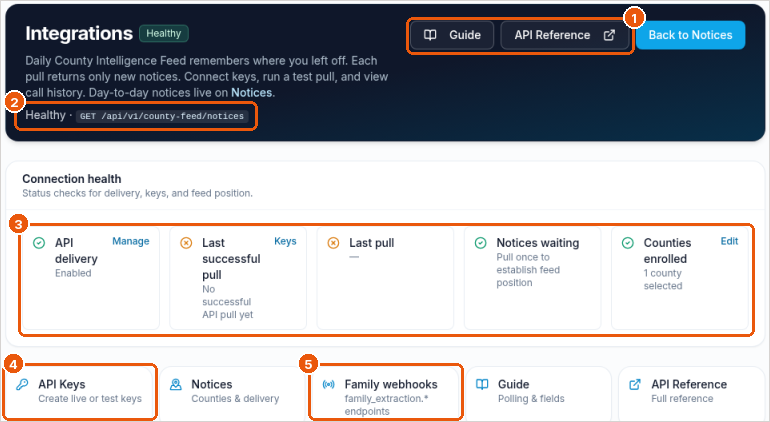
- In the sidebar, select Integrations.
- Check Connection health (callout 3): API delivery status, last successful pull, last pull, notices waiting, and counties enrolled.
- Under API key & test pull, choose a key and a limit, then select Run test pull.
- Select Copy endpoint to copy the URL for your code (callout 2).
A test pull with a live key is a real pull: notices it returns won't be returned again on that key.
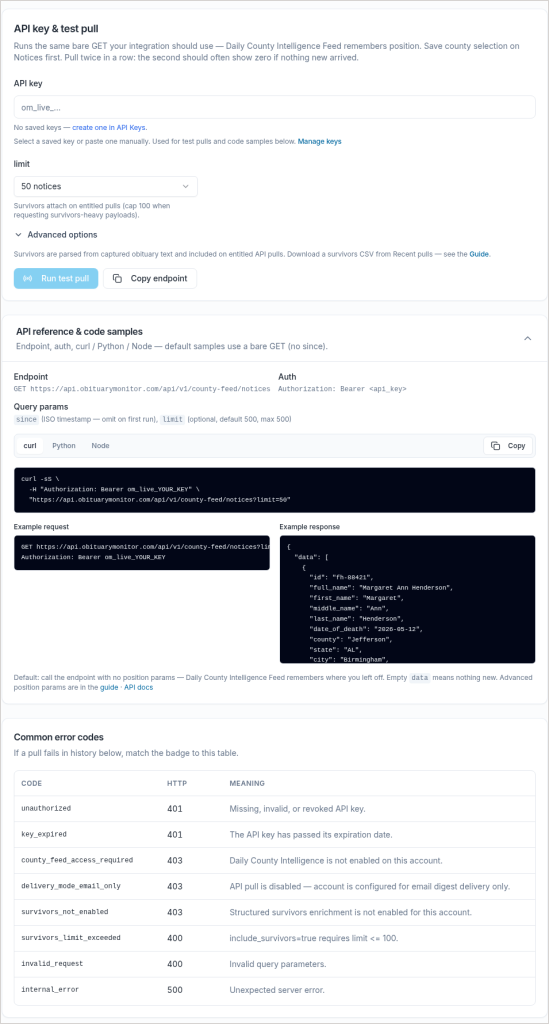
Pull notices from your code
GET https://api.obituarymonitor.com/api/v1/county-feed/notices
Authorization: Bearer om_live_...- Each pull returns what's new since your last pull on that key. An empty
datalist means nothing new. - Limit: each pull returns up to 500 notices unless you set
limit. Pull again to get more. The API Reference lists the maximum. - Family members: add
include_survivors=true. With family members, keeplimitat 100 or less. - Property: add
include_property=true(select states). See Property matching. - Rate limits: responses include rate-limit headers. Slow down if you get close.
- Code samples in curl, Python, and Node are on the Integrations page. The API Reference has every field.
- Most teams pull once or twice a day. Pull more often if you need notices sooner.
The endpoint path still contains county-feed. That's expected; it's the same API.
Regional or national pulls
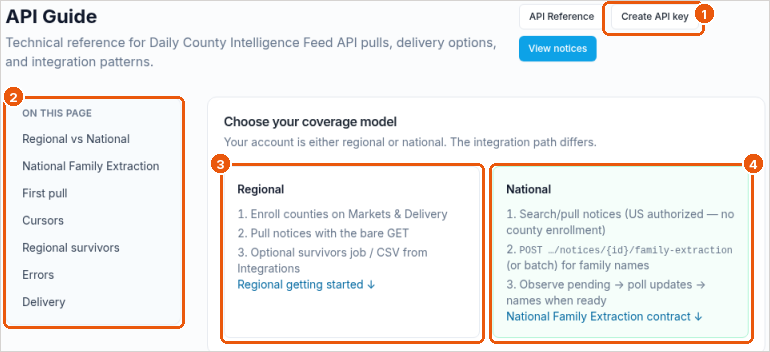
The API Guide (callout 2) explains the two ways to pull. Daily County Intelligence uses the Regional model (callout 3): enroll counties on Markets & Delivery, then pull with a plain GET. The National model (callout 4) is for Daily National Intelligence. You can create a key from the guide too (callout 1).
Error codes
| Code | Status | What to do |
|---|---|---|
unauthorized | 401 | Check the key and the Authorization: Bearer header |
key_expired | 401 | Create a new key on API Keys |
county_feed_access_required | 403 | Your account doesn't have Daily County Intelligence access. Contact support |
delivery_mode_email_only | 403 | Turn on Pull into your systems on Markets & Delivery |
survivors_not_enabled | 403 | Contact support |
survivors_limit_exceeded | 400 | Use limit 100 or less with include_survivors=true |
invalid_request | 400 | Check your parameters against the API Reference |
internal_error | 500 | Try again. If it continues, contact support |
Related
Was this article helpful?