
Professional
Set your hourly rate
Set the hourly rate and currency used in billable-activity exports.
Last updated October 8, 2026
Plan: Professional · For: Firms · Time: 1 min
Your hourly rate is used to calculate fees in the Billable Activity CSV you can export from a case.
- In the sidebar, select Billing Settings.
- Enter your Default Hourly Rate (callout 1). It starts at $350.
- Choose your Currency (callout 2). It starts as USD.
- Select Save Settings (callout 3).
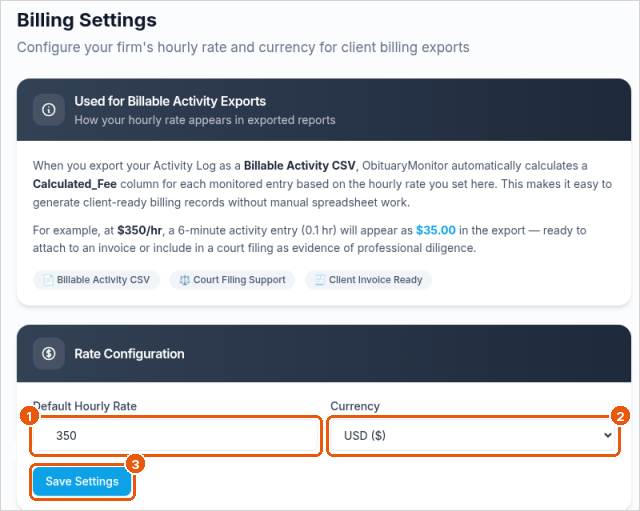
Example: at $350 an hour, a 6-minute billable entry (0.1 hour) shows a Calculated_Fee of $35.00.
The export is a record to help you prepare invoices. It isn't an invoice itself.
Related
Was this article helpful?