
Daily County Intelligence
Work your Estate Opportunities
Filter today's notices, read the details, and decide what to follow up on.
Plan: Daily County Intelligence · For: Businesses · Time: 4 min read
Estate Opportunities lists new death notices in your counties, with property and family information when we find it. It's where most teams start each day.
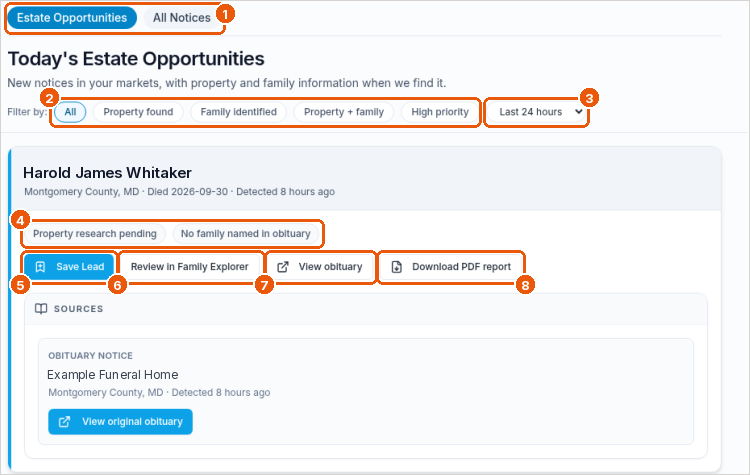
Find the notices you want
- In the sidebar, select Estate Opportunities.
- Stay on the Estate Opportunities tab, or switch to All Notices to see every notice in your markets (callout 1).
- Narrow the list with the filters (callout 2):
- All: every new notice
- Property found: we matched property to the person who died
- Family identified: the obituary names family members
- Property + family: both
- High priority: notices we've flagged to look at first
- Change the time window (callout 3). The default is Last 24 hours.
Read a notice
Each card shows the person's name, county, date of death, and how long ago we found the notice. The pills show what we know so far, for example Property research pending or No family named in obituary (callout 4).
Sources at the bottom of the card shows where the notice came from, such as the funeral home's website. Select View original obituary to read it.
Act on a notice
- Save Lead adds the notice to your Saved Leads (callout 5).
- Review in Family Explorer opens the family and property details (callout 6).
- View obituary opens the published obituary (callout 7).
- Download PDF report saves a PDF of the notice and what we found (callout 8).
From Overview, View Opportunity opens the notice record directly.
Troubleshooting
- The list is empty. Widen the time window, select All, and check that your counties are saved on Markets & Delivery.
- I don't see an older death. The feed is for recent deaths. Notices join the feed when the death was in roughly the last month and we found the notice recently.
- All Notices keeps loading. Refresh the page. If it doesn't load, contact support.
Related
Was this article helpful?