
Daily County Intelligence
Choose your markets and delivery
Pick the counties in your state and choose email summary, daily CSV files, or API delivery.
Last updated October 8, 2026
Plan: Daily County Intelligence · For: Businesses · Time: 4 min read
Markets & Delivery controls which counties are in your feed and how new notices reach your team. Your price is a flat rate per state, so adding counties in your state doesn't change what you pay.
Choose your counties
- In the sidebar, under Account, select Markets & Delivery.
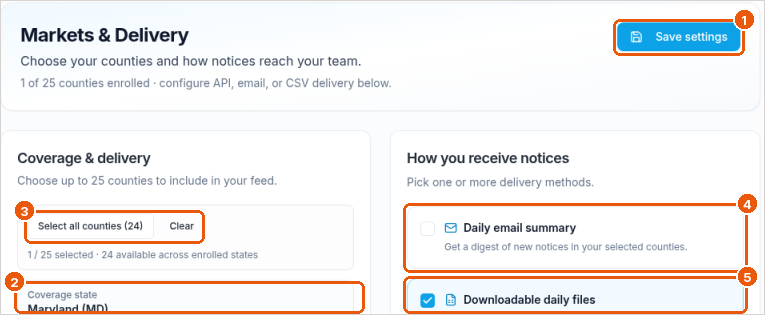
- Check Coverage state (callout 2). This is the state on your plan. To add another state, contact our team.
- Pick the counties you want. Use Select all counties to cover the whole state, or Clear to start over (callout 3).
- Select Save settings (callout 1).
Choose how notices reach you
You can pick more than one method.
| Method | What you get | Timing |
|---|---|---|
| Daily email summary (callout 4) | One email listing new notices in your selected counties | Once a day, early morning US time |
| Downloadable daily files (callout 5) | A CSV file of the day's notices | Once a day. Each file is kept for 30 days |
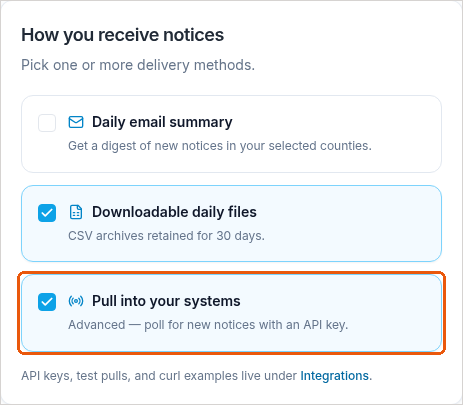
| Pull into your systems (API) | New notices on each API pull, with family members and property when you ask for them | Whenever you pull |
- Under How you receive notices, check each method you want.
- If you choose the API, set up a key next. See Connect by API.
- Select Save settings.
New notices always appear in the portal as we find them, whichever delivery methods you choose.
Troubleshooting
- The email summary doesn't arrive. Check that Daily email summary is checked and saved, then check your spam folder. To change who receives the summary, contact support.
- A county is missing from the list. Your list shows the counties in your coverage state. If one is missing, contact support.
- "Attestation required" banner. Record your attestation first. See Record your compliance attestation.
Related
Was this article helpful?