
Daily National Intelligence
National coverage, watch list, and delivery
Your coverage is nationwide. Use the watch list to set preferred states or counties, and choose how notices reach you.
Last updated October 8, 2026
Plan: Daily National Intelligence · For: Businesses · Time: 4 min read
Your Daily National Intelligence coverage includes every US state. You don't enroll counties. Instead, you can set a watch list of the states or counties you care about most.
Set your watch list
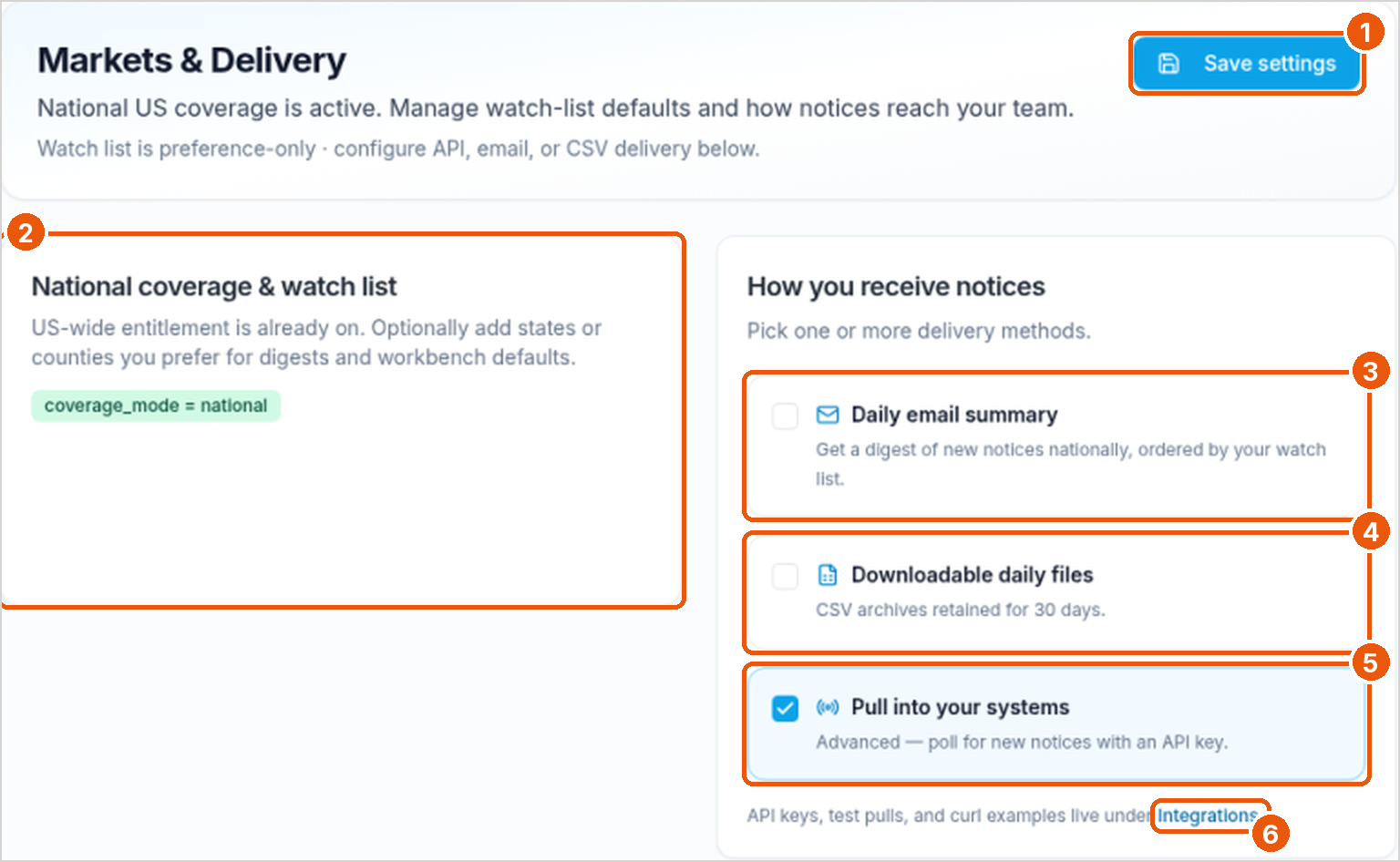
The watch list is a preference. It doesn't limit your coverage. It sets the order of your daily email summary and the default filters in the portal.
- In the sidebar, under Account, select Markets & Delivery.
- Under National coverage & watch list, add the states or counties you prefer (callout 2).
- Select Save settings (callout 1).
Choose how notices reach you
| Method | What you get |
|---|---|
| Daily email summary (callout 3) | One email a day with new notices nationally, ordered by your watch list |
| Downloadable daily files (callout 4) | A daily CSV file. Each file is kept for 30 days |
| Pull into your systems (callout 5) | New notices on each API pull |
- Check each method you want. You can choose more than one.
- Select Save settings.
- For the API, select Integrations (callout 6) to get a key and run a test pull. See Connect by API.
Related
Was this article helpful?