
Daily County Intelligence
Record your compliance attestation
Confirm permissible use of notice data before you rely on it in production.
Last updated October 8, 2026
Plan: Daily County Intelligence · For: Businesses · Time: 3 min read
Before you rely on notice data in production, we ask each customer to record an acceptable-use attestation. Until you do, a yellow attestation required banner appears on some pages.

Record your attestation
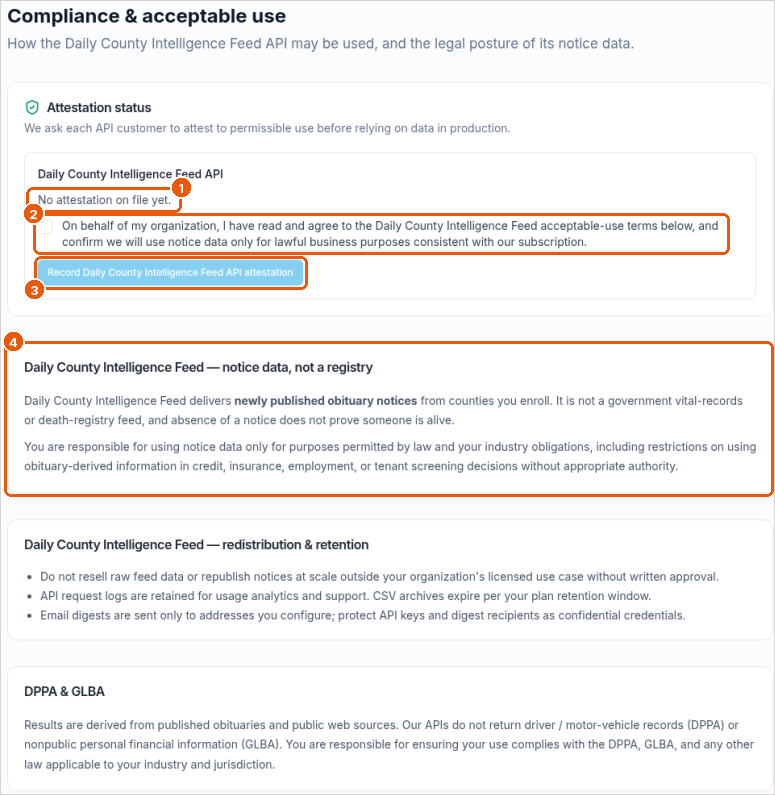
- Select Go to Compliance on the banner (callout 1 above), or go to
/app/developer/compliance. - Check Attestation status (callout 1).
- Read the acceptable-use terms on the page (callout 4).
- Check the box to agree on behalf of your organization (callout 2). You confirm you'll use notice data only for lawful business purposes consistent with your subscription.
- Select the Record attestation button (callout 3).
What the terms say
- Notice data, not a registry. Notices come from published obituaries and public web sources. They aren't a government vital-records or death-registry feed, and the absence of a notice doesn't prove someone is alive.
- No DPPA or GLBA data. We don't use motor-vehicle records (DPPA) or nonpublic financial information (GLBA).
- Not a consumer report. ObituaryMonitor isn't a consumer reporting agency. Don't use the data for decisions covered by the Fair Credit Reporting Act (FCRA), such as credit, insurance, employment, or housing eligibility.
- Lawful use is your responsibility. Follow the laws that apply to your outreach where you operate.
Related
Was this article helpful?