
Daily National Intelligence
Connect by API: keys, test pulls, and limits
Create your own API keys, run a test pull, and pull national notices into your systems.
Last updated October 8, 2026
Plan: Daily National Intelligence · For: Developers · Time: 5 min read
You can create your own API keys. Your account was set up by our team, so you're ready to connect.
Create an API key
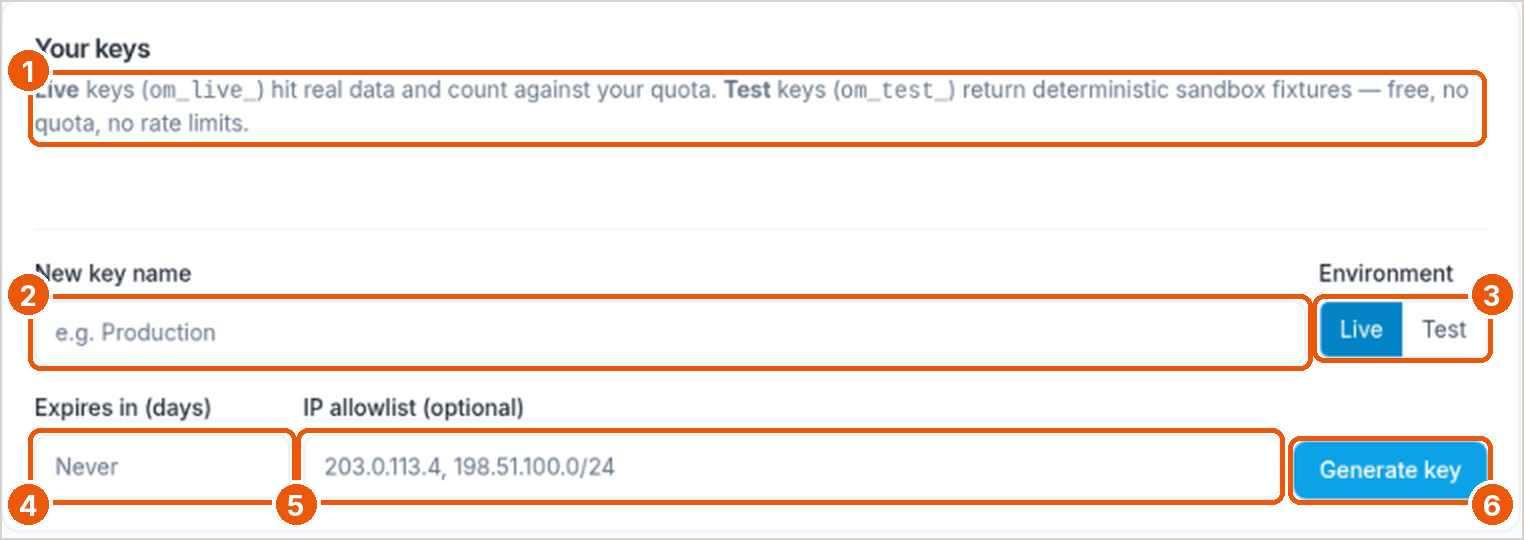
- In the sidebar, under Developer tools, select API Keys.
- Enter a key name (callout 2) and choose Live or Test (callout 3). Live keys (
om_live_…) return real notices. Test keys (om_test_…) return sample data (callout 1). - Optional: set an expiry (callout 4) and an IP allowlist (callout 5).
- Select Generate key (callout 6) and store the key safely.
You can have up to 10 active keys.
Run a test pull
- Select Integrations.
- Under API key & test pull, choose a key and a limit, then select Run test pull.
- Copy a code sample (curl, Python, or Node).
A test pull with a live key is a real pull. Notices it returns won't come back again on that key.
Pull national notices
Daily National Intelligence uses the National model in the API Guide: no county enrollment, and you can narrow by state.
GET https://api.obituarymonitor.com/api/v1/county-feed/notices
Authorization: Bearer om_live_...- Each pull returns what's new since your last pull on that key. An empty
datalist means nothing new. - Limit: each pull returns up to 50 notices unless you set
limit, up to 500. Pull again to get more. - Family members:
include_survivors=truewithlimit100 or less. See Family members on national notices. - The full error list is in the Daily County Intelligence API article and applies here too.
Related
Was this article helpful?