
Daily County Intelligence
Family Explorer and related family members
See the family members named in each obituary, plus property context, and filter by what we found.
Plan: Daily County Intelligence · For: Businesses · Time: 4 min read
Every Daily County Intelligence notice includes the related family members named in the obituary, at no extra cost. Family Explorer is where you research them alongside any property we found.
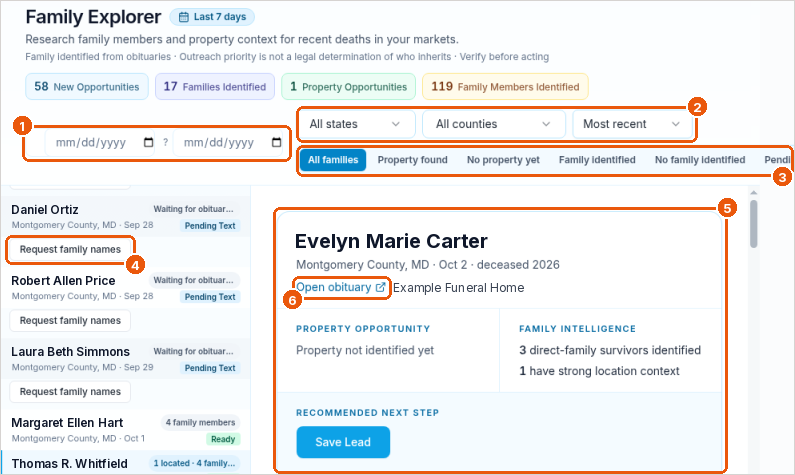
Find a family
- In the sidebar, select Family Explorer. The default view is the Last 7 days.
- Set a date range (callout 1), or choose a state, a county, and the sort order (callout 2).
- Use the chips to filter (callout 3): All families, Property found, No property yet, Family identified, No family identified, or Pending.
- Select a person in the list to open their record (callout 5).
Read the record
- Property opportunity shows any property we matched, or Property not identified yet. See Property matching.
- Family intelligence shows how many direct-family members the obituary names, and how many have strong location context.
- Open obituary opens the source (callout 6).
When family names aren't ready yet
Some records in the list show Request family names (callout 4). Select it and we'll pull the family members from the obituary. It's included in your subscription. The record shows Ready when names are available.
If the obituary doesn't name any relatives, the record shows No family named in obituary.
Use family information responsibly
Family Explorer shows who the obituary names. Outreach priority isn't a legal determination of who inherits. Verify before you act, and follow the terms you accepted on the Compliance page.
Troubleshooting
- The counts at the top don't match the list. Use the list and the filters as your guide.
- A record stays Pending. Check back later. If it hasn't changed after a day, contact support with the person's name and county.
Related
Was this article helpful?