
Daily County Intelligence
Get started with Daily County Intelligence
What Daily County Intelligence gives you, how to sign up, and a tour of the portal.
Last updated October 8, 2026
Plan: Daily County Intelligence · For: Businesses · Time: 4 min read
Daily County Intelligence is a real-time feed of death notices for the state and counties you cover. We sweep obituary sources in your area continuously, so new notices appear in your portal as we find them. Each notice comes with the related family members named in the obituary, at no extra cost. In select states we also look for property linked to the person who died.
Sign up
Sign up online and start a 5-day free trial.
- Go to Start your 5-day free trial.
- Pick one state. Your free trial covers every county in it. You can add more states after the trial at $249/mo each.
- Create your account and add a card. Nothing is charged today.
- Your trial starts right away and lasts 5 days. After that, you're billed $249/mo per state until you cancel. See Your trial and continuing service.
Sign in
- Go to obituarymonitor.com and select Sign in.
- Sign in with the email address you signed up with.
- You land on Overview.
The sidebar
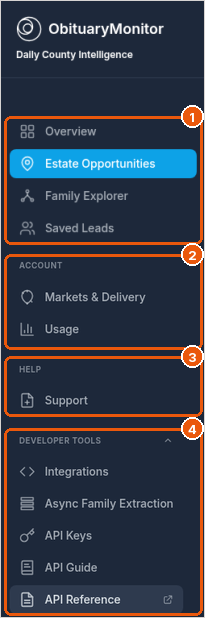
- Overview, Estate Opportunities, Family Explorer, and Saved Leads are where you work new notices (callout 1).
- Account: Markets & Delivery sets your counties and how notices reach you. Usage shows your API activity (callout 2). If you signed up online and added a card, Billing is in this group too. It shows your plan, trial end date, and invoices, and it is where you update your card or cancel. If our team set up your account and you don't see Billing, email support@obituarymonitor.com to cancel or to ask a billing question.
- Help: Support is where you open a support case (callout 3).
- Developer tools: Integrations, API Keys, the API Guide, and the API Reference. You only need these if you pull notices into your own systems. They appear once Pull into your systems is turned on in Markets & Delivery (callout 4).
The Overview page
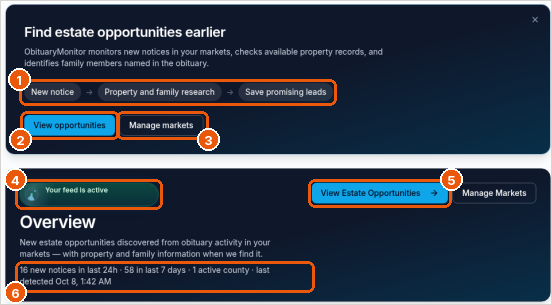
- The workflow strip shows how the product works: a new notice arrives, we add property and family research, and you save promising leads (callout 1).
- Select View opportunities to open today's notices (callout 2), or Manage markets to change your counties and delivery (callout 3).
- Your feed is active confirms your coverage is on (callout 4).
- View Estate Opportunities opens the list of new notices (callout 5).
- The summary line shows new notices in the last 24 hours and the last 7 days, your active counties, and when we last found a notice (callout 6).
Your first 15 minutes
- Record your compliance attestation. If you see a yellow "attestation required" banner, select Go to Compliance and record it. See Record your compliance attestation.
- Check your counties and delivery on Markets & Delivery. See Choose your markets and delivery.
- Open Estate Opportunities and look at today's notices. See Work your Estate Opportunities.
- Save a lead you want to follow up on. See Save and work leads.
Good to know
- Notices come from published obituaries and public web sources. It's notice data, not a government death registry, and a missing notice doesn't prove someone is alive.
- Family members and property context are leads to verify. They aren't a legal determination of who inherits.
- The product name in some places in the portal may still read "Daily County Intelligence Feed".
Related
Was this article helpful?